DirectX
Directx was introduced by Microsoft as an API mainly used by game developers.
It includes software interfaces to support video, graphic, audio and controller hardware.
Part of it is an engine used to render 3D scenes. This part is called Direct3D.
This documentation concentrates on this interface and its link to Common Vision Blox images.
The DirectX version used to build the CVB GPU Processing tool is 9.0c November 2005 and it’s available as a runtime installation as well as a SDK including all header and library files.
The SDK version is not required to execute an application using the CVB GPU Processing tool, nevertheless the runtimes of DirectX needs to be installed on the target system.
The runtimes can be downloaded here:
While developing your own shaders you might need access to the reference of the High Level Shader language.
This can be found online here:
http://msdn.microsoft.com/en-us/library/bb173009(VS.85).aspx
Alternatively you might want to install the SDK version of DirectX 9.0c that can be found here:
A good introduction to DirectX that covers the different versions, especially DirectX 9.0c, can be found here:
http://en.wikipedia.org/wiki/DirectX
Window Handle (hWnd)
The primary idea of Direct3D is to render data to a window for display purposes.
Because of this Direct3D is always created for such a window handle and so this is required in CVB GPU Processing as well.
On the other hand displaying the image data is not the primary goal of this tool, so we can use any window handle used in our application to create Direct3D such as the main window handle.
The only restriction is that the lifetime of the window defines the lifetime of all generated Direct3D objects, meaning destroying the window handle that is used to create Direct3D should be the last task in the application. All other objects created by the tool must be destroyed before the window is destroyed.
Related functions:
D3DCreate
D3DIsD3D
Off-screen Memory
As mentioned above, Common Vision Blox Direct3D Processing is mostly not used for display purposes, yet it provides functions to allocate images in the VGA memory that are not visible on the screen.
This memory is called the Off-screen memory and it is used as a frame memory providing fast access via the GPU.
CVB GPU Processing provides functions to copy image data to and from this memory.
Surfaces
A surface represents a 2D image in a linear block of memory.
The size of a surface is limited by the hardware driver and can be created in either 8Bit monochrome, 16Bit monochrome, 24Bit color or 32Bit color format.
The restriction of the surface size can be found using the DirectX panel in the control panel.
To view them just open the DirectX panel of the control panel, select the DirectDraw tab and click the Caps Bits button. Or search for dxcapsviewer.exe on your system.
This will open up a window like the one below.
Select your graphics adapter and open the tree under D3D Device Types/HAL/Caps.
The maximum size of textures and surfaces is shown in MaxTextureWidth and MaxTextureHeight.
 |
Surfaces can be copied to other surfaces using the Blitter of the GPU, but not all surfaces are accessible for the blitter hardware.
Only those surfaces allocated in the Off-Screen Memory of the GPU are valid source surfaces and only surfaces allocated as a BlitTarget are valid destination surfaces.
Related functions:
D3DCreateSurfaceEntrance
D3DCreateSurface
D3DIsObject
Textures
A texture is a stack of surfaces and used to store the images in different sizes.
The different sizes are used in computer games if an object moves in a scene and comes closer to the camera.
In such a scenario it can first display the object in a lower resolution and as the object comes closer it switches to a higher resolution representation. Common Vision Blox Direct3D Processing uses textures in only one resolution.
As with Surfaces the maximum size of textures is defined by the hardware driver and can be viewed in the DirectX panel in the control panel (refer above).
Textures can be rendered to other textures using the PixelShader of the GPU, but not all textures are available for the rendering hardware.
Only those textures allocated in the Off-Screen Memory of the GPU are valid source textures and only textures allocated as a RenderTarget are valid destination textures.
Related functions:
D3DCreateTextureEntrance
D3DCreateTexture
D3DIsObject
Frontbuffer
The frontbuffer is the surface that is assigned to the window.
It has the same size (width and height) as the window and it uses the display resolution (bits per pixel) that’s assigned to the monitor that shows the window.
The frontbuffer typically reflects the window content.
Backbuffer
The backbuffer is some kind of mirror of the frontbuffer, but it is not visible.
The idea is to first finish painting in the background and than copying the final image to the frontbuffer.
In this case the display will not show any flicker, a technique commonly known as double buffering.
Related functions:
D3DGetBackbuffer
BlitTarget / BlitSource
A blitter is again a unit of the GPU to perform operations on surfaces.
These operations always combine the pixels of a source surface and the corresponding pixels of the destination surface.
As the operations always access the image data in the raster of its pixels they are also called raster operations.
In contrast to a BlitTarget a BlitSource is accessible via the host CPU.
In order to use the Blitter of the GPU, first copy the image data first to a BlitSource and then blit it to BlitTargets.
A BlitTarget can also act as a BlitSource but you can’t access its image data via the host CPU.
Related functions:
D3DIsBltSource
D3DIsBltTarget
RenderTarget / RenderSource
If you consider an operation that takes not only one input pixel but a number of pixels you end up in another operation unit called pixel shader to render the source texture to a destination texture.
In contrast to a RenderTarget a RenderSource is accessible via the host CPU.
In order to use the Pixel Shader of the GPU, first copy the image data to a RenderSource and then render it to RenderTargets.
A RenderTarget can also act as a RenderSource but you can’t access its image data via the host CPU.
Related functions:
D3DIsRenderSource
D3DIsRenderTarget
Blitter
The Blitter (from BLIT or “Block Image Transfer”) is a highly optimized unit of the GPU that is used to copy image data from one surface to another.
During the copy process it can perform so called raster operations between the corresponding pixels of the two surfaces as well as rescaling of the image data.
In CVB GPU Processing we use the Blitter only to copy data without performing any raster operations other than replacing the pixels of the destination surface.
Related functions:
D3DBlt
D3DBltRect
Pixel shader
The Pixel shader is a highly optimized unit of the GPU that is used to manipulate the pixel values of a texture.
Programming this unit is the core of CVB GPU Processing.
To program the Pixel shader DirectX supports the High Level Shader Language, HLSL (refer Shader File) which is very similar to the Cg language developed by NVIDIA.
During the evolution of DirectX GPU manufacturers changed the version of the Pixel shader.
The main differences between the Pixel shader versions is the number of registers that are available in the Pixel shader.
Registers are used to store constants as well as temporary variables used in the shader program.
The following table summarizes the differences in the pixel shader versions:
http://en.wikipedia.org/wiki/High_Level_Shader_Language
An overview of the supported Pixel shader version of graphic cards using NVIDIA GPUs can be found here:
http://en.wikipedia.org/wiki/Comparison_of_Nvidia_graphics_processing_units
The same overview for ATI / AMD based graphic cards can be found here:
http://en.wikipedia.org/wiki/Comparison_of_ATI_graphics_processing_units
Related functions:
D3DRender
Vertex shader
The optimized GPU unit called Vertex shader is used to modify the vertex data of a 3D object.
A 3D object in DirectX is always defined by its position in the 3D scene.
The position is called a vertex and it can define a point, a vector or a n-tuple.
A 3D object is defined by a number of vertices and it’s called a primitive.
Typical operations on the vertex are e.g to find the parts of the object that are visible for a given 3D position of a camera that views the 3D scene that contains several objects.
The current version of CVB GPU Processing does not expose any interfaces to use the vertex shader of the GPU.
Geometry processor
This unit calculates the appearance of a scene in the 3D environment as it is rendered by the pixel and vertex shader.
In general there are two different models for viewing a scene, both models are available in CVB GPU Processing:
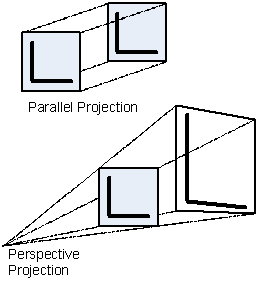
Parallel projection
This is an orthogonal projection that projects the co-ordinates of objects in a scene only by using rays that are orthogonal to the image plane.
This results in a projection that displays the object always in a scaling of 1 and with no rotation as the resulting image is independent of the position of the image plane.
This is the first choice for many image processing applications that want to modify the image pixels only without applying any scaling or rotation to the original image.
Perspective projection
A perspective projection uses all other rays from the camera position to the image plane.
Depending on the orientation and position of the image plane the resulting image will be zoomed and/or scaled independently in x, y and z.
Using this projection you can process the pixel data while applying a geometric transformation to the image in just one pass through the GPU.
The following schematic illustrates the difference between parallel and perspective projections:
 |
The following link gives an overview about 3D projections:
http://en.wikipedia.org/wiki/3D_projection
The German version of Wikipedia gives an even better overview here:
http://de.wikipedia.org/wiki/Projektion_%28Geometrie%29
Related functions:
D3DSetWorldView
D3DSetWorldViewIdentity
D3DSetProjectionType
D3DGetProjectionType
A shader file is a simple text file that contains HLSL source code.
Once such a file is loaded it will be compiled using the HLSL compiler which is part of the DirectX runtimes.
A flag indicates whether a potential compiler error message will be display or not.
To protect intellectual property, a shader file can be encrypted using a tool shipped with CVB GPU processing.
The tool uses the attached CVB serial number to protect the shader file to a specific CVB serial number.
Of course the host can write variables used in the shader program, but it can’t read any variables used in the shader program.
The only way around this limitation is to use a part of the image data to store additional results such as histogram data that were calculated on the GPU.
Related functions:
D3DCreateShaderFromFile